The Agent Web-Data Stack, 2026: A Field Map for Builders
An agent can reach the web through five layers: plain fetch, extraction APIs, scraper marketplaces, remote browsers, and unblocking networks. Start at the top and move down only when the layer above fails on your site. Whatever layer you use, keep the scraped rows out of the model's context: the agent starts jobs and reads counts and samples, and the data moves straight into your storage.
DisclosureSome outbound links may be affiliate links. If you buy through a monetized link, I may earn a commission at no extra cost to you. Commission never changes the editorial order. Features, pricing, and program terms change; confirm them with the vendor. Catalog snapshot: 2026-09-28.
Evidence level: source verified against each vendor's documentation · Reviewed: November 12, 2026 · Methodology
Vendors appear as examples of a layer. This page compares what each one documents. It does not rank them by speed or success rate, because no equal test has been run yet.
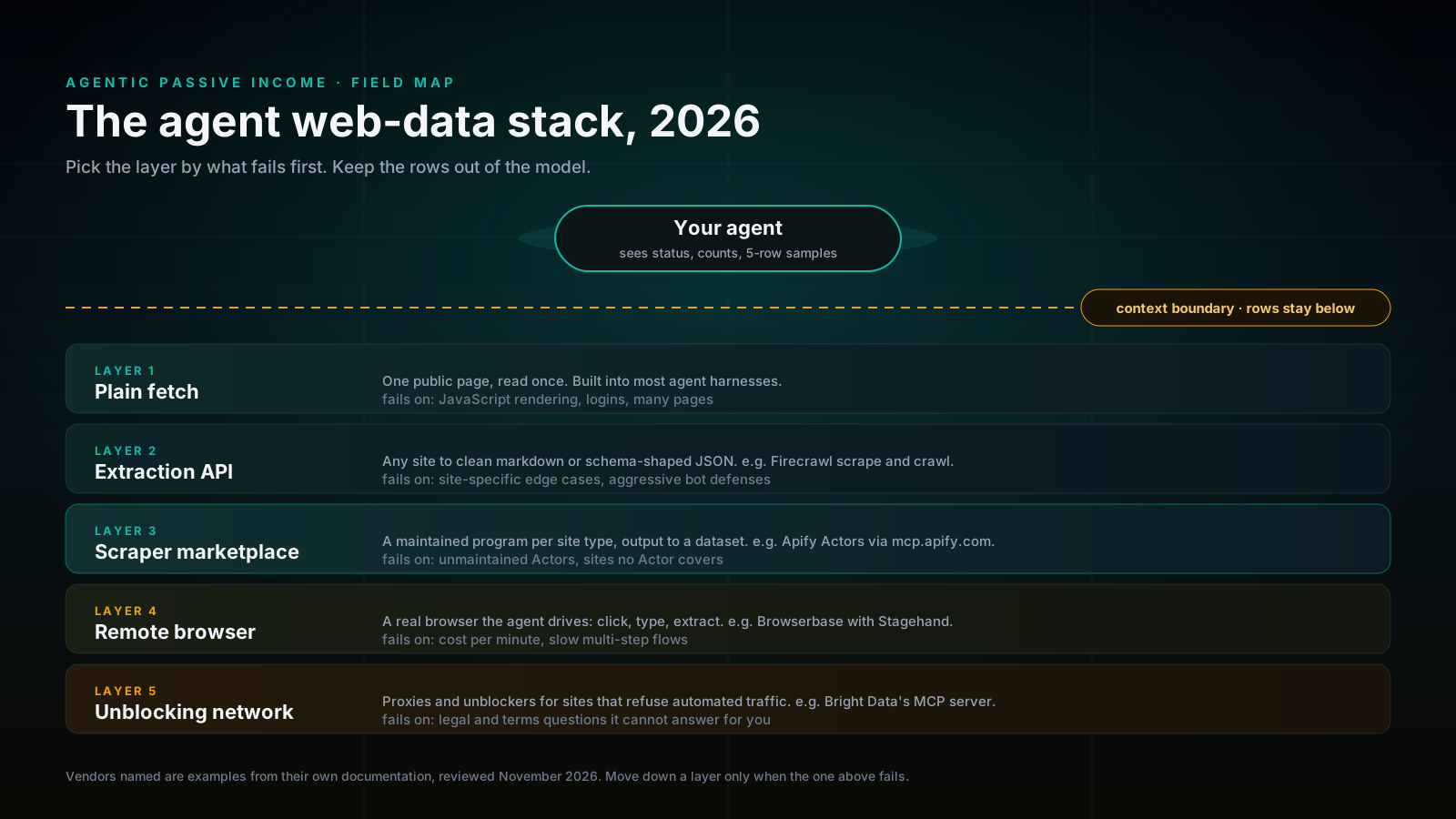
The five layers
1. Plain fetch. The tool most agent harnesses already include. It reads one public page and returns its text. It is the right first try for documentation, articles and anything you would read once.
2. Extraction APIs. A service turns any URL into clean markdown or JSON shaped by a schema you give it. Firecrawl's MCP server documents a scrape tool that returns markdown or, in JSON format, data matching a prompt or schema; a crawl tool that runs until the crawl finishes, with a status tool to resume a crawl that timed out; and an agent tool for jobs where Firecrawl has to find the sources itself. Its older Extract tool is deprecated. Use this layer when the sites vary and you want one consistent output format.
3. Scraper marketplaces. Instead of one general extractor, you pick a program built for one kind of site and maintained by its publisher. Apify calls these Actors and exposes them to agents through a hosted MCP server at mcp.apify.com. Every run gets a dataset you can read through Apify's API in pages. The catalog is large: in November 2026 Apify's store page advertised more than 118,000 Actors. Size cuts both ways, so check an Actor's last update and open issues before you build on it.
4. Remote browsers. When a site needs clicks, logins or JavaScript to show its data, the agent drives a real browser in the cloud. Browserbase documents a hosted MCP endpoint over Streamable HTTP, built on its Stagehand library, and recommends it over running the server locally. This layer handles pages the others cannot, and it is typically slower than a plain fetch, because the browser has to load and act on every page.
5. Unblocking networks. Some sites refuse automated traffic. Proxy and unblocking services route requests so they succeed. Bright Data's MCP FAQ describes a free tier of 5,000 credits a month, where web search (its SERP API) and page scraping (its Fetch API) cost one credit per request. Browser control tools are on by default, and usage beyond the free tier is charged to a prepaid balance. Getting past a block does not settle whether you are allowed to collect the data; that question stays with you.
| Best fit | Pricing | Evidence | Vendor | |
|---|---|---|---|---|
| Apify (scraper marketplace) | Many pages of one site type where a maintained Actor exists | Verify current plan | Source verified: docs.apify.com MCP integration | Not linked |
| Bright Data (unblocking network) | Sites that block automated requests | Free tier of 5,000 credits a month per its MCP FAQ; verify | Source verified: docs.brightdata.com MCP FAQ | Not linked |
| Browserbase (remote browser) | Logins, clicks, JavaScript-heavy flows | Verify current plan | Source verified: docs.browserbase.com MCP | Not linked |
| Firecrawl (extraction API) | Varied sites, one consistent markdown or JSON output | Verify current plan | Source verified: docs.firecrawl.dev MCP tools | Not linked |
| Plain fetch | One public page, read once | Usually included in the agent harness | Built into most harnesses | Not linked |
The design rule: the model never sees the rows
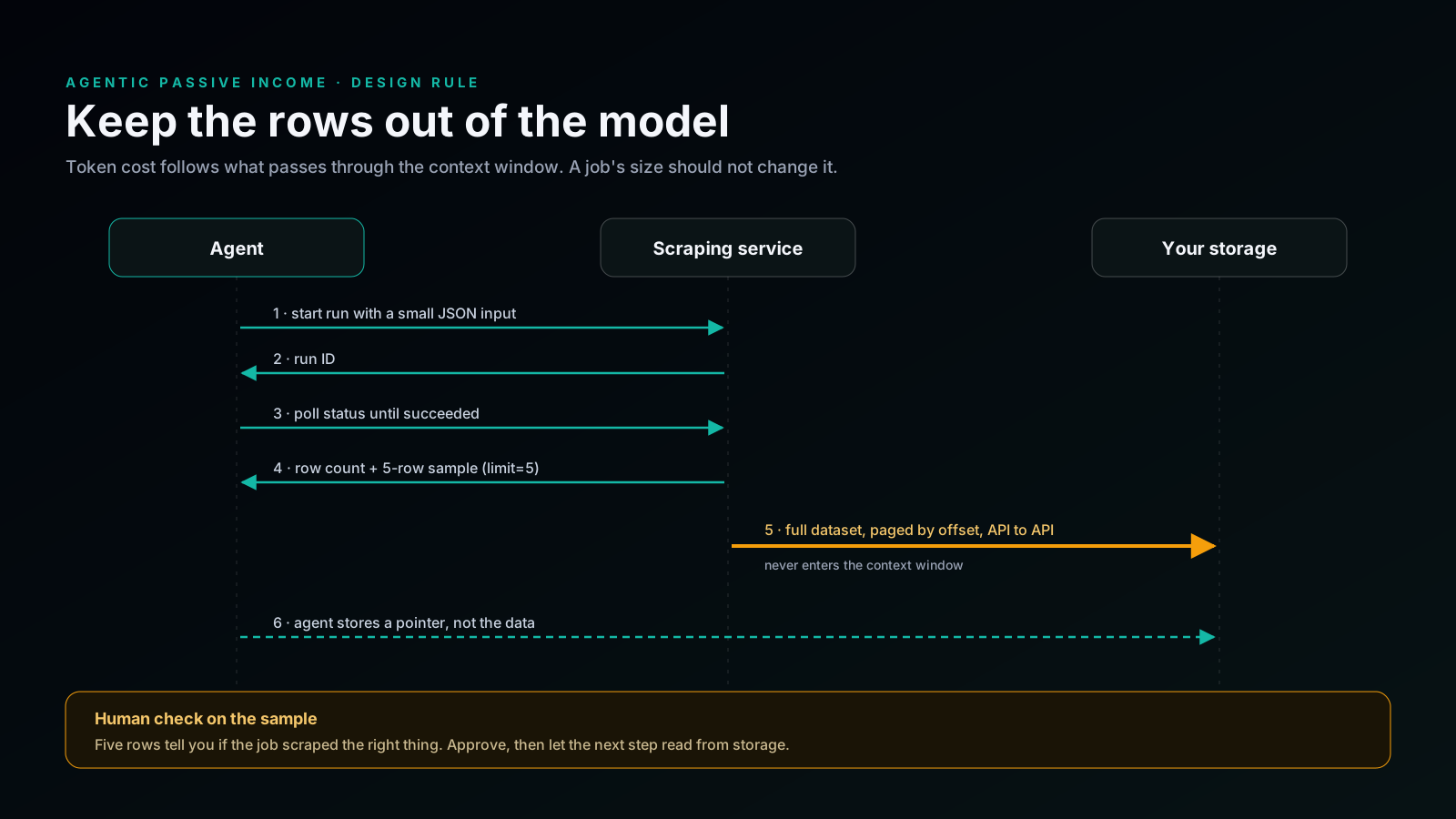
The bill for an agent job follows how much text passes through the model. An agent that reads every scraped row into its context pays for each row, slows down as the job grows, and eventually runs out of context. An agent that only starts the job, checks its status, and reads the count plus a handful of sample rows keeps the model-side cost roughly flat whether the job returns fifty rows or fifty thousand; scraper usage and storage still grow with the job.
In practice:
- Start the run with a small input and keep the run ID.
- Poll the status instead of waiting inside one long call.
- Read the count and a sample of about five rows. Apify's dataset API, for example, takes
limitandoffsetparameters, so a sample is one cheap request. - Move the full dataset by API to your own storage, page by page. The model is not in that path.
- Store a pointer (a dataset ID or a file path) in the agent's notes, never the data itself.
The sample is also where a person checks the job. Five rows show whether the scraper picked up the right field, and checking takes seconds.
Choose by what fails first
- The page is public and you need it once: fetch.
- The sites vary and you want one output shape: extraction API.
- You need many pages of one site type and a maintained scraper exists: marketplace.
- The data appears only after a login or clicks: remote browser.
- Requests are blocked and the terms allow collection: unblocking network.
Layers combine. One useful pair is a marketplace Actor for the bulk pull and a plain fetch to spot-check a few pages by hand.
Failure modes that cut across layers
- Silent partial results. Pagination limits and soft blocks return fewer rows without an error. Compare the count with what you expect.
- Drift. Sites change layout. Anything that worked last month needs a recurring sample check.
- Context blowup. Reading full datasets into the model is a common and expensive cost mistake in agent data work.
- Rights. Terms of service and data-protection law apply on every layer. Personal data carries extra obligations, for example under the GDPR.
Where to go next
For the scraper-marketplace layer in depth, read when Apify is the right layer. For a complete weekly workflow built on it, read the competitor price watch. For the broader system and product path, continue to AgenticIncome.
Frequently asked questions
Which web-data tool should an AI agent use?
Start with the simplest layer that works for your site: plain fetch, then an extraction API, a scraper marketplace, a remote browser, or an unblocking network, in that order. Move down only when the layer above fails.
Why should the model not read the scraped data?
Model cost and speed follow the amount of text in its context. If the agent reads only job status, row counts and a small sample, the model-side cost stays roughly flat as the job grows, and the full data moves to storage by API. Scraper usage and storage still scale with the job.
Do these tools work with Claude Code?
Firecrawl, Apify, Browserbase and Bright Data each document an MCP server, which is how Claude Code and other MCP clients call them as tools. Check each vendor's current setup page.
Is it legal to scrape websites with an agent?
It depends on the site's terms, the data you collect and the law where you operate. An unblocking service can get past a block, but it does not make the collection permitted.
Are vendor links selected by commission?
No. A monetized link can appear only after editorial verification, and it cannot change the order or verdict.