A Competitor Price Watch Your Agent Runs, With a Stop Condition
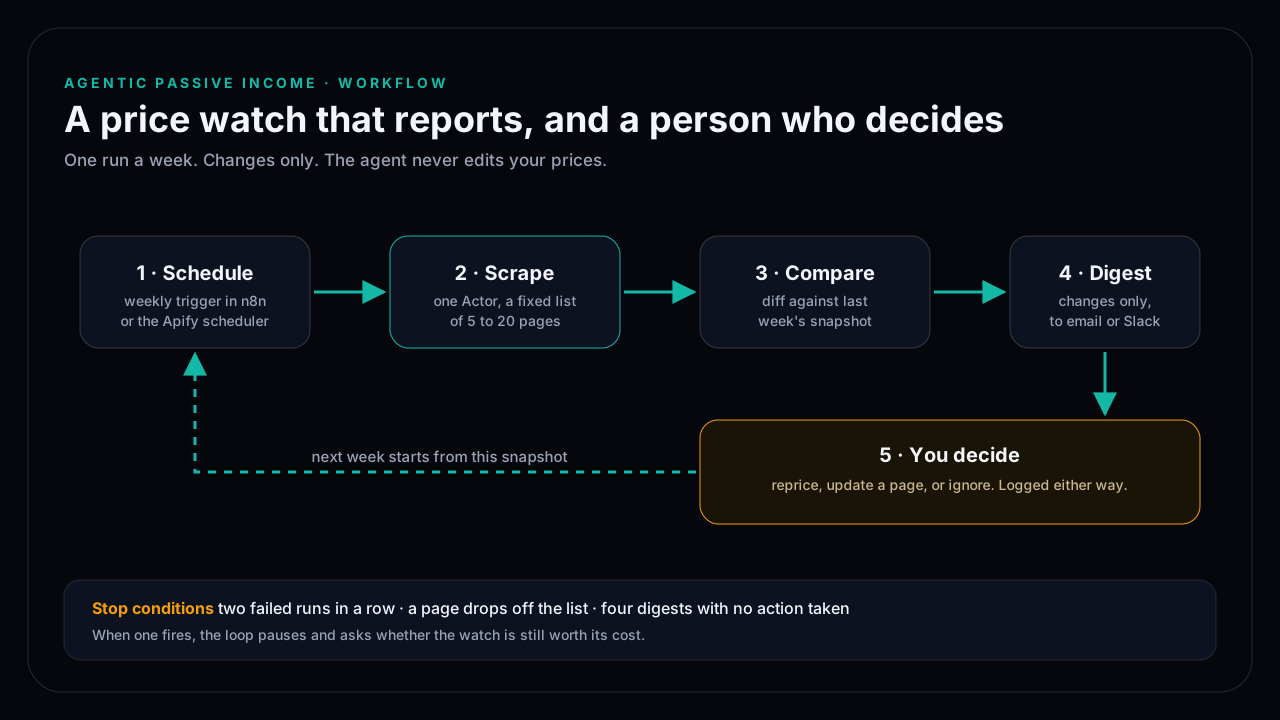
Run a weekly scrape of 5 to 20 competitor pages, compare it with last week's snapshot, and send yourself a digest of changes only. You decide what to do with each change. The workflow pauses itself after two failed runs, when a page drops off the list, or when four digests in a row lead to no action.
DisclosureSome outbound links may be affiliate links. If you buy through a monetized link, I may earn a commission at no extra cost to you. Commission never changes the editorial order. Features, pricing, and program terms change; confirm them with the vendor. Catalog snapshot: 2026-09-28.
Evidence level: desk review · Reviewed: November 11, 2026 · Methodology
This is a workflow design, not a measured case study. The steps use standard features of Apify and n8n; test each one on your own pages before scheduling it.
Who this is for
Founders and creators who sell a product with visible competitors: a template, a course, a SaaS plan, a skill pack. If you check competitor pricing pages by hand every few weeks, this replaces the checking. It leaves the deciding to you.
The five steps
- Schedule. A weekly trigger, either in n8n or in Apify's own scheduler. Weekly is enough for most pricing pages and keeps usage low.
- Scrape. One Actor runs over a fixed list of URLs. Start with a general page-content Actor; switch to a site-specific one only if the general output misses prices.
- Compare. Store each run's rows as a snapshot and diff them against the previous one on a stable key, usually the URL plus plan name.
- Digest. Send only the changed rows to email or Slack: old value, new value, link. An unchanged week sends one line saying so.
- Decide. You reprice, update a comparison page, or ignore the change. Log the decision, because the log is what tells you whether the watch is worth running.
Why the agent does not reprice
Scraped data fails without warning. A redesigned page can turn "$49/month" into an empty field or a different plan's price. An automatic repricing step would act on that error. Keeping a person at step 5 costs a few minutes a week and removes the worst failure.
Stop conditions
- Two failed runs in a row. The page changed or started blocking requests. Fix the input or retire the URL.
- A page drops off the list. A competitor removed or renamed the plan. Update the list by hand.
- Four digests with no action. The watch is not changing any decision. Pause it, or cut it to monthly.
What it costs to run
Cost depends on the Actor, the number of pages, and how often it runs. Apify publishes current plan prices at apify.com/pricing. Run the workflow once by hand, read the usage it reports, and multiply by four for a monthly estimate before you turn on the schedule. Set a monthly usage limit in your Apify account either way.
Rights
Pricing pages are public, but the site's terms still apply. Collect prices and plan names only, not customer reviews or personal data, and keep request volume low.
Before building this, read when Apify is the right layer. For the broader system and product path, continue to AgenticIncome.
Frequently asked questions
How often should a price watch run?
Weekly suits most pricing pages. Daily runs cost more and rarely change a decision unless prices move daily in your market.
Can the agent change my prices automatically?
It can, but this workflow deliberately does not. Scraped data fails without warning, and a person reviewing a short digest catches errors an automatic step would act on.
Do I need n8n?
No. Apify can schedule runs itself. n8n helps when you want the diff and the digest in one place alongside your other workflows.
When should I stop running it?
When four digests in a row lead to no action, the watch is not informing decisions. Pause it or reduce it to monthly.
Are vendor links selected by commission?
No. A monetized link can appear only after editorial verification, and it cannot change the order or verdict.