Give Your Agent the Web: When Apify Is the Right Layer, and When It Is Not
Use Apify when your agent needs structured data from many pages of the same kind of site (listings, profiles, prices, reviews) and a maintained Actor already exists for that site. Skip it for a single page, where a plain fetch is cheaper, and for any site whose terms forbid automated collection. Whatever you choose, put a person between the dataset and the action.
DisclosureSome outbound links may be affiliate links. If you buy through a monetized link, I may earn a commission at no extra cost to you. Commission never changes the editorial order. Features, pricing, and program terms change; confirm them with the vendor. Catalog snapshot: 2026-09-28.
Evidence level: source verified against Apify's documentation · Reviewed: November 11, 2026 · Methodology
This guide does not report a benchmark. It explains where Apify fits, using Apify's published documentation, and lists the checks to run on your own task before you rely on it.
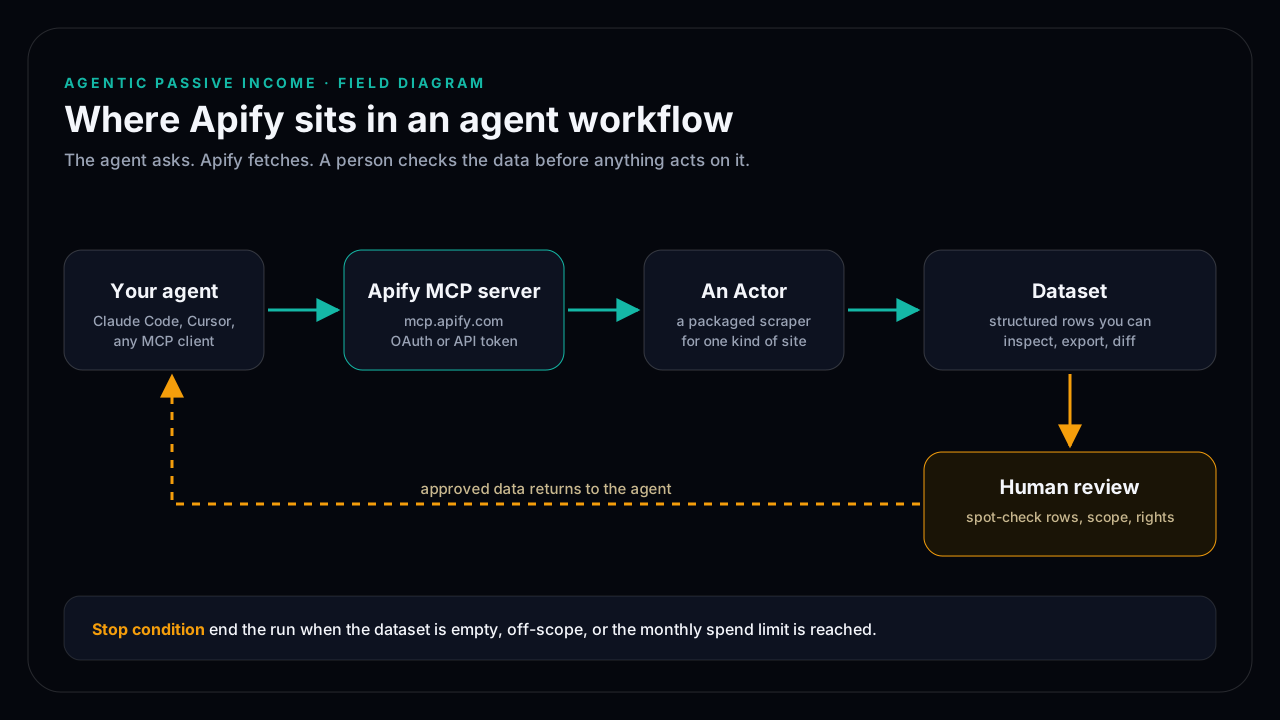
What Apify adds to an agent
An agent with only a fetch tool reads one page at a time and has to parse raw HTML itself. Apify packages that work as Actors: hosted programs built for one kind of site or task, which take a small JSON input and return rows in a dataset. Your agent asks for "the last 50 reviews of this product" and gets back a table instead of a page of markup.
Apify runs a hosted MCP server at mcp.apify.com. In an MCP client such as Claude Code you add it as an HTTP server and sign in with OAuth or an Apify API token. Apify's documentation recommends naming the exact tools to load with a ?tools= parameter rather than taking the defaults, which keeps the agent's tool list short and its choices predictable.
Decide before you connect anything
| Best fit | Pricing | Evidence | Vendor | |
|---|---|---|---|---|
| Apify Actor via MCP | Many pages of one site type, where a maintained Actor exists | Usage-based; verify current plan at apify.com/pricing | Source verified (docs); run your own task before relying on it | Not linked |
| Plain web fetch | One page, read once, no login, no pagination | Usually included in your agent tool | Built into most agent harnesses | Not linked |
| Your own script | A site no Actor covers, or a job you will run for years | Your time plus hosting | You own the maintenance when the site changes | Not linked |
The useful question is how often the job repeats. A one-off lookup does not justify a new account and a billing relationship. A weekly pull of the same 200 listings does, because someone has to maintain the scraper when the site changes, and with a maintained Actor that someone is not you.
Failure modes to expect
- The Actor breaks when the site changes. Check the Actor's last update date and open issues before you build on it. Prefer Actors maintained by Apify or with recent activity.
- The dataset looks complete and is not. Pagination limits, blocked requests, and login walls produce partial results without an obvious error. Count rows against what you expect.
- The agent acts on unreviewed data. A scraped price feeding straight into a repricing step is how a parsing bug becomes a real loss.
- Costs creep. Usage-based pricing scales with runs. Set a monthly usage limit in your Apify account before the first scheduled run.
Stop conditions to set first
Write these down before connecting the server:
- End a run when the dataset is empty or contains rows outside the scope you asked for.
- Pause a schedule after two failed runs in a row.
- Stop at the monthly spend limit, and review whether the job still earns its cost.
- Retire the workflow if nobody has acted on its output for a month.
Rights and personal data
Scraping public pages is still subject to the site's terms and to data-protection law where you operate. Collecting personal data, such as names and profiles, brings obligations under rules like the GDPR in the EU. Keep only the fields the task needs, and do not republish another site's content as your own.
A first task worth running
Pick one repeated job you already do by hand, such as checking five competitor pricing pages. Run it once through an Actor, compare the dataset with what you see in the browser, and note what was missing. If the rows match, the price watch workflow shows how to schedule it with a review step.
For the broader system and product path, continue to AgenticIncome.
Frequently asked questions
Do I need Apify to give Claude Code web access?
No. Claude Code and most agent harnesses can fetch single pages already. Apify helps when you need structured results from many pages of the same kind of site and a maintained Actor exists for it.
How does an agent connect to Apify?
Through the hosted MCP server at mcp.apify.com, signed in with OAuth or an Apify API token. Apify recommends listing the exact tools to load instead of using the defaults.
What does Apify cost?
Apify uses usage-based plans and publishes current prices at apify.com/pricing. Prices change, so check the page and set a monthly spending limit before scheduling runs.
Is scraping legal?
It depends on the site terms, the data collected, and the law where you operate. Personal data carries extra obligations. Collect only what the task needs and check the terms first.
Are vendor links selected by commission?
No. A monetized link can appear only after editorial verification, and it cannot change the order or verdict.